
PeptideIQ iOS App: Launch Status, Features & Waitlist
PeptideIQ iOS App: Launch Status, Features, and Early Access
You searched for the PeptideIQ iOS app because you want it on your iPhone. Here is the short truth: it is built for the iPhone first, it has not launched yet, and the waitlist is the way in. This page sets out what exists, what is planned, and what has not been decided.
Key Takeaways
- PeptideIQ is iPhone-first: iPhone at launch, iPad later, and Android in Phase 2 after the iOS launch.
- PeptideIQ is pre-launch as of this writing. The waitlist is open at peptideiq.io, and there is no PeptideIQ download yet.
- Pricing has not been announced. The planned model is freemium: core protocol tracking free, the AI co-pilot and advanced analytics on a subscription.
- The app is a guided protocol system with an AI co-pilot, not a plain dose log.
Contents
- Is PeptideIQ Available on iPhone Yet?
- What Does the PeptideIQ iOS App Do?
- How Do You Set Up a Protocol in the PeptideIQ iOS App?
- Will PeptideIQ Come to iPad or Android?
- How Do I Get Early Access to PeptideIQ on iPhone?
- Is the PeptideIQ App Free?
- Frequently Asked Questions
Is PeptideIQ Available on iPhone Yet?
No. PeptideIQ is pre-launch, so there is no PeptideIQ download for iPhone today. The iOS app is the first platform the team is building for, and the waitlist at peptideiq.io is open now. No launch date has been announced.
That answer matters because "PeptideIQ download" and "PeptideIQ iPhone app" are the same question in different words. Both lead to the same place: a waitlist, not a store page. If you see a page claiming otherwise, treat it with suspicion until peptideiq.io says the app is live.
Here is the status at a glance.
| Item | Status |
|---|---|
| iPhone app | Pre-launch, waitlist open at peptideiq.io |
| iPad | Planned for after the iPhone launch |
| Android | Planned for Phase 2, after the iOS launch |
| Web app | None at launch |
| Pricing | Not announced; freemium planned |
| Launch date | Not announced |
The short version: iPhone first, waitlist now, everything else later. We will not call it "available" until it is.
What Does the PeptideIQ iOS App Do?
PeptideIQ is a guided system for people already running peptide protocols. You build a protocol, log every dose in about a minute, track how you feel, and ask an AI co-pilot that sees your own data rather than answering generically.
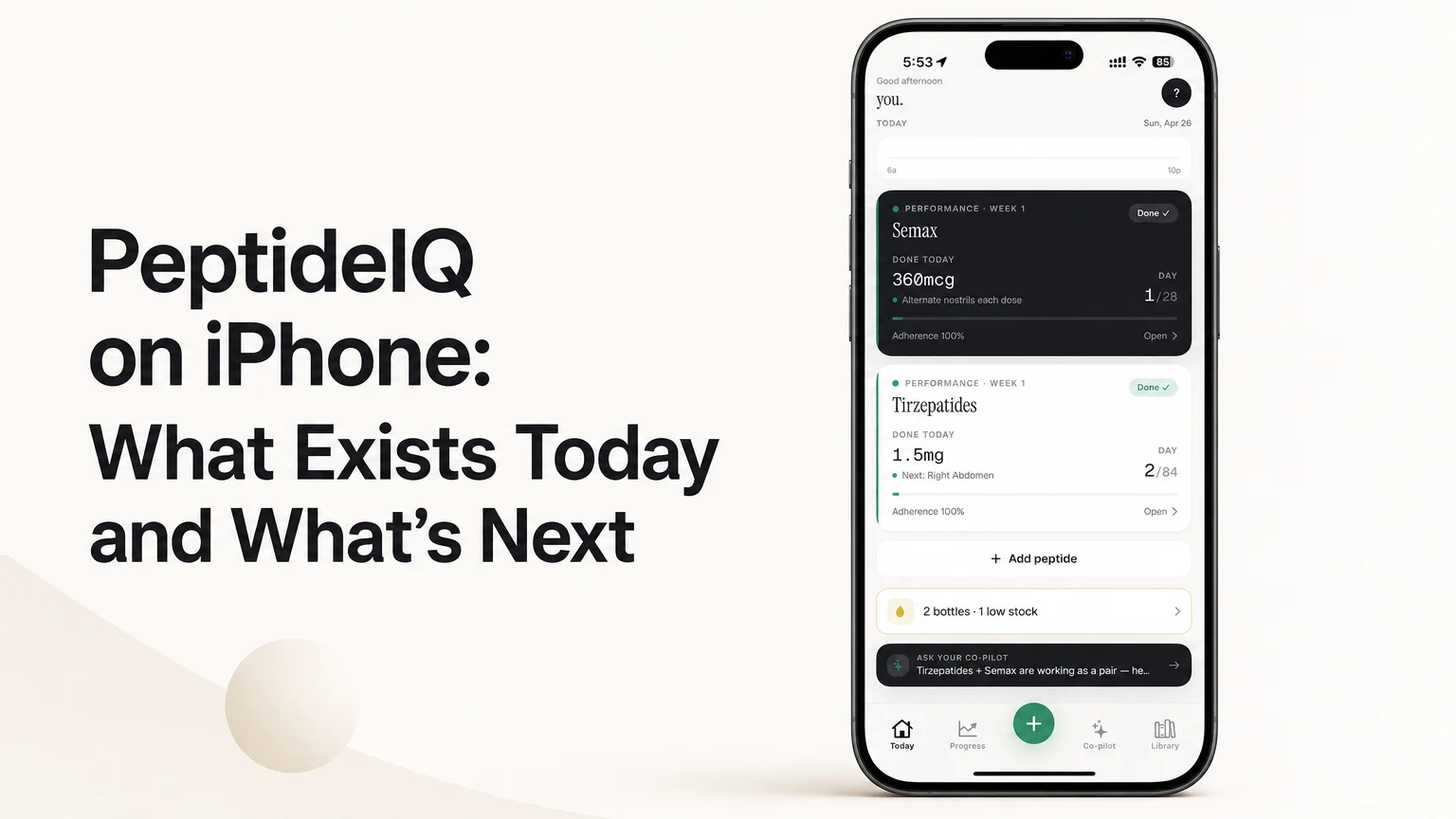
The screen you land on each day is the Today view. Each active peptide gets its own card with the current day of the cycle, a progress bar, the amount for the next dose, and adherence. In our product screenshot, a Semax card reads Day 1 of 28 and a tirzepatide card reads Day 2 of 84, both marked done.
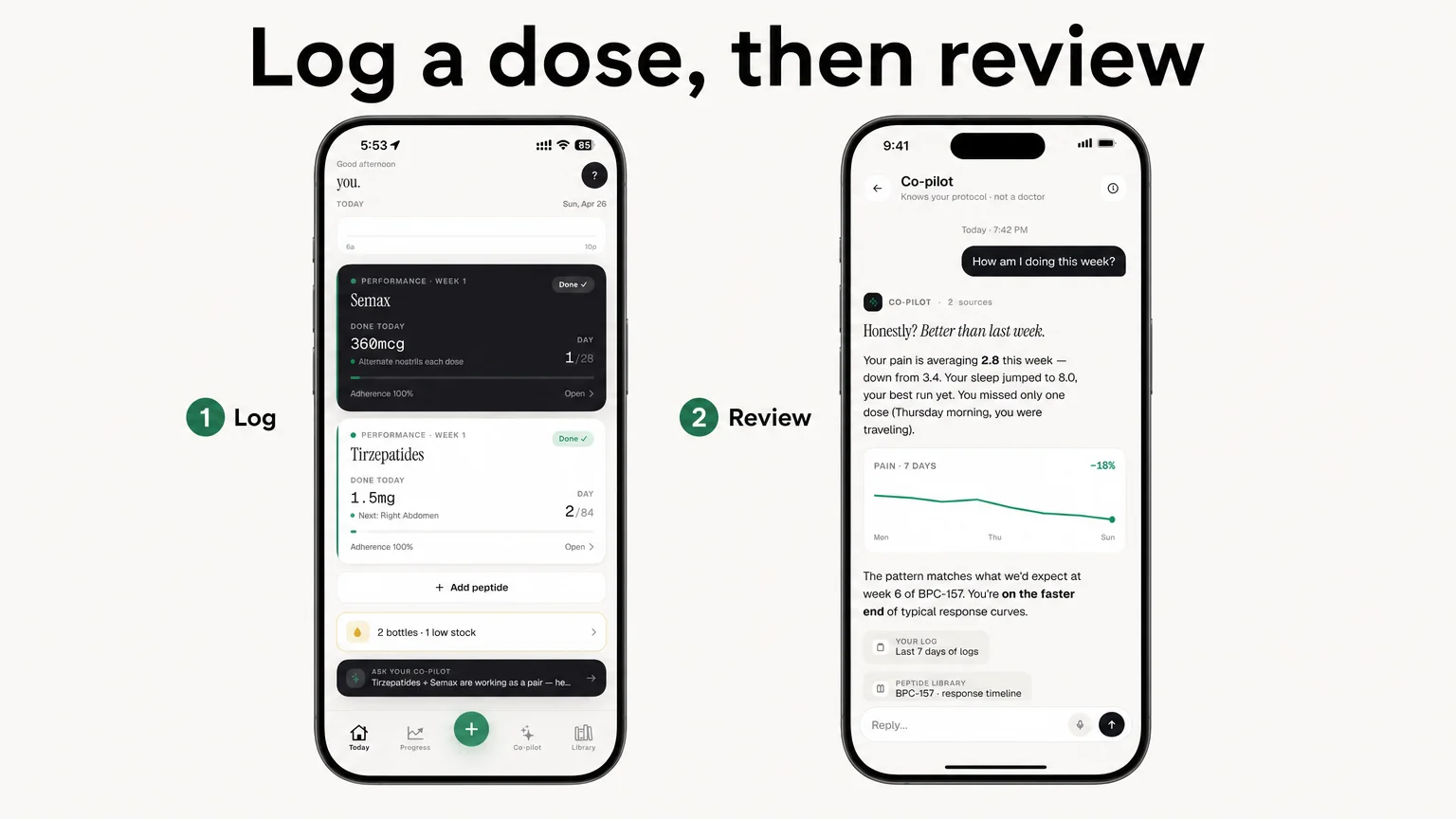 Log on the Today screen, then review in the co-pilot. Both screens are from the PeptideIQ iPhone app.
Below the cards sits a stock warning ("2 bottles · 1 low stock") and an "Ask your co-pilot" prompt. The bottom bar has four tabs: Today, Progress, Co-pilot, and Library.
How logging a dose works
Dose logging is designed to take around 60 seconds. The app pre-fills your scheduled dose, then shows a syringe illustration with the exact line to draw to. It also rotates injection sites with a body diagram, so you can see which spots you used recently.
After that come four quick sliders for energy, mood, sleep quality, and a goal metric. An optional side-effect grid and a note field finish the flow, and both can be skipped.
What the AI co-pilot does differently
The co-pilot is the second half of the product. It works from your active protocols, your cycle day, your last seven days of wellness logs, your logged side effects, and any bloodwork you have added. That is the difference between it and a general chatbot with peptide facts.
In the co-pilot screenshot, a user asks "How am I doing this week?" and gets an answer built from their own log: pain down to 2.8 from 3.4, sleep at 8.0, one missed dose. The reply also says the pattern is consistent with week 6 of a BPC-157 response curve.
What this means for you: the value is not the chat box. It is that the answer comes from numbers you logged, so the more consistently you log, the more specific it gets.
For the full argument on how this differs from other trackers, read the PeptideIQ review. If you want the broader product explainer, what PeptideIQ is covers it from the start.
What else is in the design
The product definition also covers a protocol library with evidence-level badges, a reconstitution calculator, a half-life visualizer, an inventory manager, a bloodwork tracker, and a fasting timer. Core features such as dose logging and the calculator are designed to work offline and sync when you reconnect. Face ID or Touch ID lock is optional.
Treat this as the plan for the launch product. Features can shift between now and release, and we will not list anything here as shipped until it is.
How Do You Set Up a Protocol in the PeptideIQ iOS App?
You set up a protocol in a guided, step-by-step planner on the iPhone. It starts by asking what you are running, then walks through dose, any escalation, cycle length, schedule, and a final review before you commit.
The planner has six steps. Step one, shown in the screenshot below, asks "What are you running?" with a searchable peptide list. A selected peptide shows a short description and a research-stage tag, such as the "Early Human Trials" label on CJC-1295, plus the route of administration.
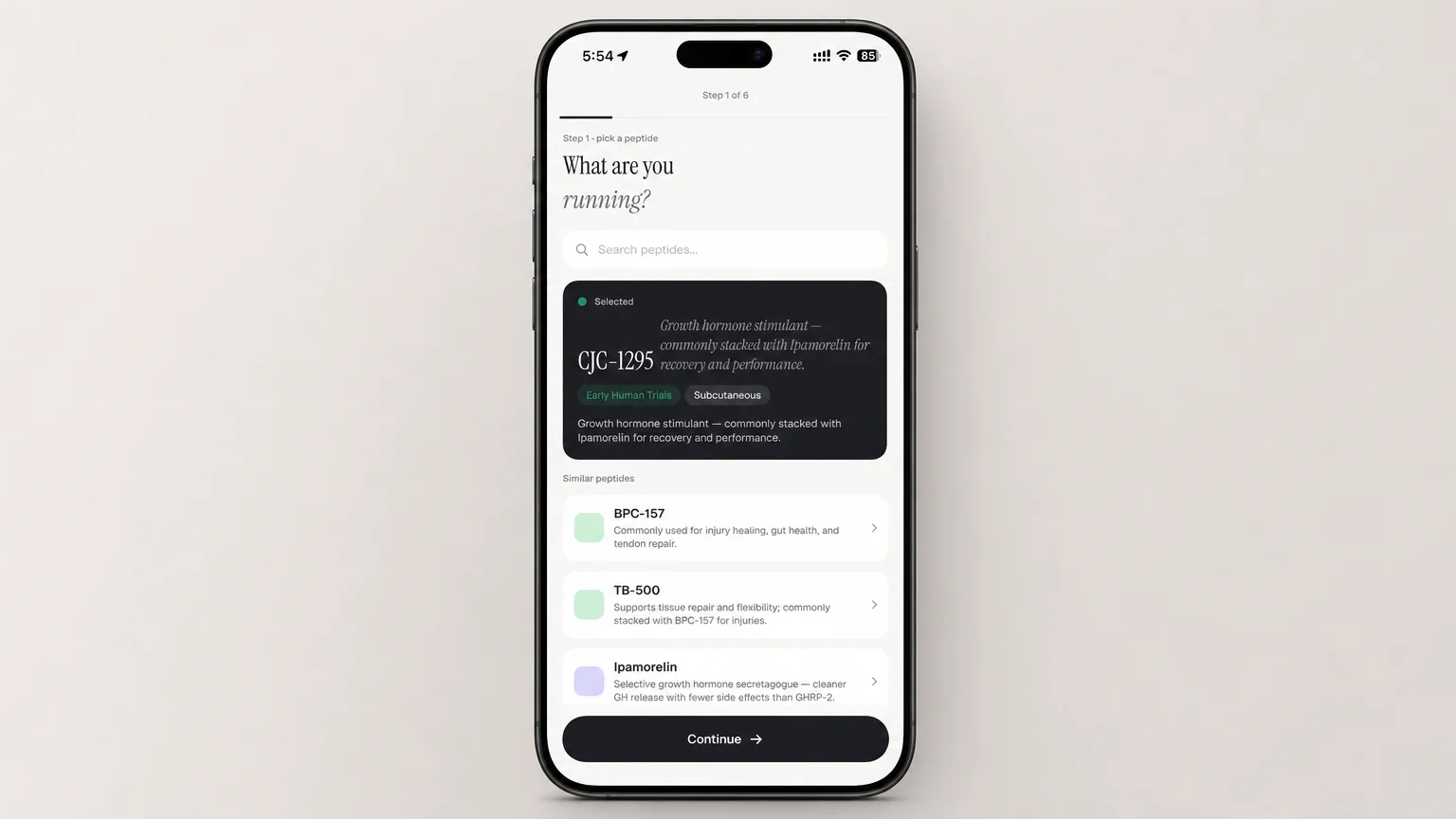 Step 1 of 6 in the PeptideIQ protocol builder: pick a peptide.
After the peptide, the planner covers these steps:
- Dose. The app suggests a starting dose with an explanation, and you can adjust it. Units switch between mg, mcg, and IU.
- Dose escalation. An optional phase builder, for example weeks 1 to 4 at one dose and weeks 5 to 8 at another. The app reminds you when each phase changes.
- Cycle length and rest. Weeks on, an optional rest period, and a calendar preview.
- Injection schedule. Daily, every few days, or specific weekdays. For peptides that need fasted administration, a fasting timer turns on automatically.
- Review. A visual summary of the whole plan, with an "Ask AI about this protocol" button.
Start with step one and the rest follows. If you are brand new to the whole subject, the guide to what a peptide is is a sensible place to begin before you pick anything.
Common mistake: treating the planner as medical advice. It organises a plan you have decided on. It does not replace a clinician, and several peptides here are not FDA-approved.
Will PeptideIQ Come to iPad or Android?
Yes to both, in a defined order. The iPhone app comes first, an iPad version comes later, and Android is planned for Phase 2 after the iOS launch. There is no web app at launch.
That order is a decision, not a delay. Building one platform well before adding a second keeps the first release tighter. It also means iPhone users are first in line, which is why the waitlist is pitched at them.
No dates are attached to iPad or Android. If Android is your main device, our sibling page, PeptideIQ for Android, covers what is available now and what is coming, so we will not repeat it here.
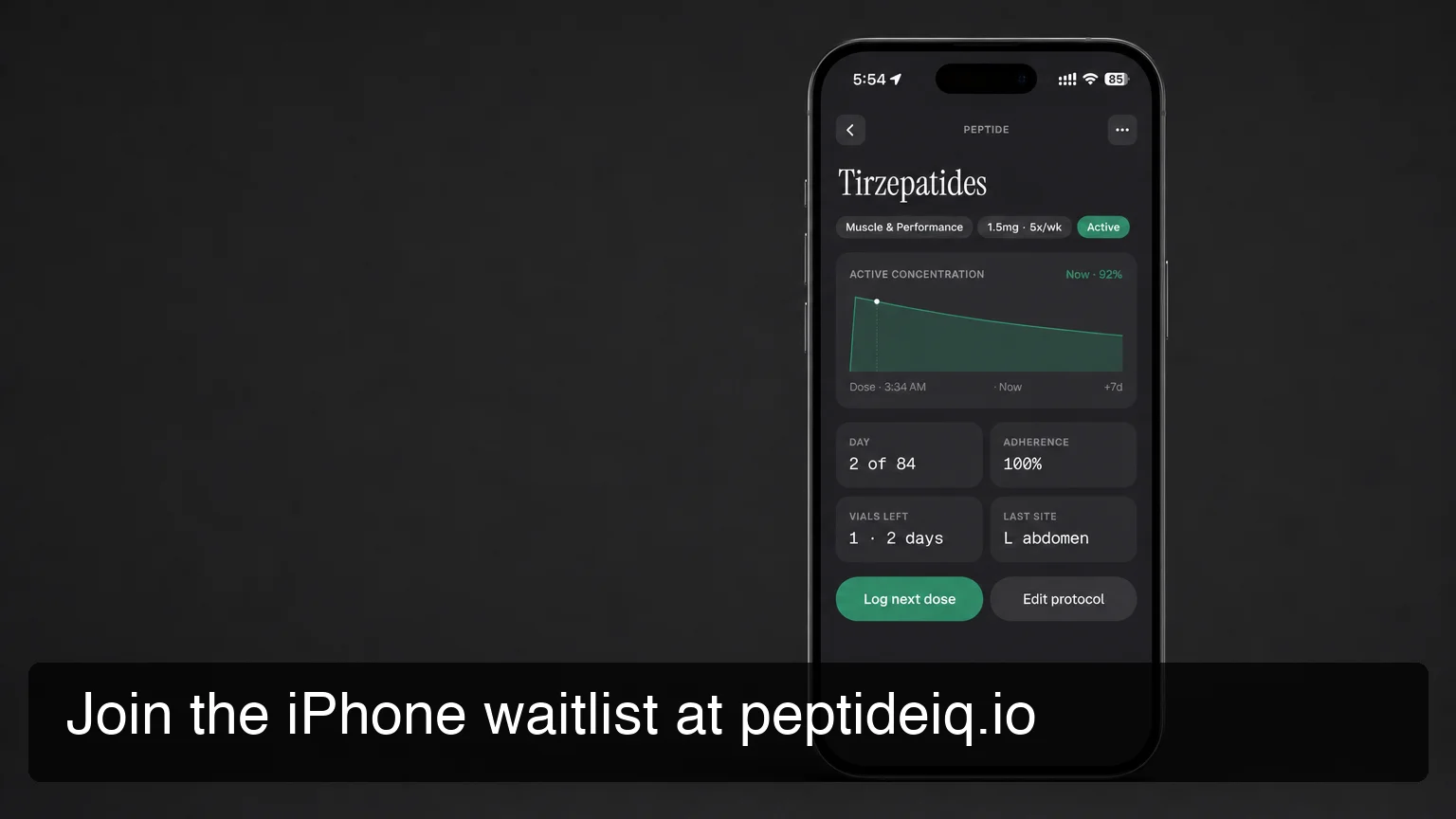 The protocol detail screen: day count, adherence, vials left, last injection site, and a "Log next dose" button.
How Do I Get Early Access to PeptideIQ on iPhone?
Join the waitlist at peptideiq.io. That is the only early-access route PeptideIQ has announced for iPhone. There is no TestFlight link, beta code, or download page to hunt for.
The waitlist is the right move if you already run a peptide protocol, or are about to, and want a system instead of a spreadsheet. If you are still comparing options, look at the best peptide apps compared first. Pick the one that fits how you track.
The protocol detail screen above shows what you would see on day two of an 84-day cycle. It lists the day, adherence, vials left, and the last injection site, plus an active-concentration chart for the peptide.
Get Started with PeptideIQ on iPhone
PeptideIQ is the guided protocol system and AI co-pilot for people who take peptides seriously, and the iPhone app is where it launches first. The waitlist is how you get in line.
Join the PeptideIQ iPhone waitlist
Is the PeptideIQ App Free?
Not fully, and not yet decided. Pricing has not been announced. The planned model is freemium: core protocol tracking free, with the AI co-pilot and advanced analytics on a subscription.
Here is how that splits as planned.
| Layer | Planned tier |
|---|---|
| Core protocol tracking | Free |
| AI co-pilot | Subscription |
| Advanced analytics | Subscription |
| Price points | Not announced |
Reality check: "Freemium planned" is not a price. Until peptideiq.io publishes one, any number you see for PeptideIQ is a guess.
Frequently Asked Questions
Is there a PeptideIQ iOS app I can download today?
No. PeptideIQ is pre-launch, so there is no confirmed App Store release to download. The iPhone app is the first platform being built, and the waitlist at peptideiq.io is open now. Check peptideiq.io for the launch announcement rather than third-party pages.
Does PeptideIQ work on iPad?
An iPad version is planned for after the iPhone launch. At launch the app is iPhone only. No iPad release date has been announced, so the waitlist remains the place to follow progress.
Is there a PeptideIQ Android app?
Android is planned for Phase 2, after the iOS launch. It is not available now, and there is no web app at launch either. Our PeptideIQ for Android page tracks that status.
How much will PeptideIQ cost?
Pricing has not been announced. The planned model is freemium, with core protocol tracking free and the AI co-pilot and advanced analytics on a subscription. We will not quote a number until the team publishes one.
What makes PeptideIQ different from a dose tracker?
A dose tracker records what you tell it. PeptideIQ adds a guided protocol planner and an AI co-pilot that reads your cycle day, dose history, wellness logs, and goals. The aim is to explain what your data shows, not only store it.
Is PeptideIQ medical advice?
No. PeptideIQ is a wellness tracking and guidance app, and its AI says to consult a professional when that is genuinely warranted. Many peptides are not FDA-approved. Talk to a clinician before starting or changing any protocol.