
PeptideIQ vs Competitors: What Actually Differs
PeptideIQ vs Competitors: What Actually Separates the Apps
Seven days of wellness logs, your cycle day, logged side effects, any bloodwork on file, your goal. That is the context PeptideIQ's co-pilot loads at the start of every conversation. A general chatbot loads none of it, and most trackers have no AI to load it into.
That gap, plus four specific tracking features, is most of the PeptideIQ vs competitors story. Here is the data, category by category. (New here? Learn what PeptideIQ does differently in our full guide.)
Key Takeaways
- The comparison is really four categories: generic health loggers, basic peptide dose loggers, general AI chatbots, and GLP-1 weight programs. Each covers part of the job.
- PeptideIQ's co-pilot is initialized with the user's active protocols, cycle day, last 7 days of logs, side effects, bloodwork, goal, and experience level.
- Reconstitution calculator, bloodwork tracking, fasting timers, and injection site rotation are built into PeptideIQ. Generic loggers don't cover peptide protocols at all.
- PeptideIQ is pre-launch, iOS-first, with a waitlist at peptideiq.io. Pricing is not announced.
PeptideIQ vs competitors: what's the difference from other peptide tracking apps?
PeptideIQ is a guided protocol system with an AI co-pilot that knows your cycle, logs, and labs. Other options are generic health loggers, basic peptide dose loggers, or general chatbots. Each records or answers, but none combines protocol structure, peptide tools, and personal context in one app.
Here is the category view, based on our product research. Individual apps change, so verify any app you are weighing.
| Capability | PeptideIQ | Generic health logger (e.g. MyFitnessPal, Cronometer) | Basic peptide logger | General AI chatbot (e.g. ChatGPT, Claude) |
|---|---|---|---|---|
| Built around peptide protocols | Yes | No | Yes | No |
| AI that sees your cycle day and logs | Yes, loaded every conversation | No AI context for peptides | Typically none | No, unless you retype it |
| Reconstitution calculator | Built in | No | Typically none | Can do math if you prompt it |
| Bloodwork tracking | Built in | No | Typically none | No stored history |
| Fasting window timer | Built in | No | Typically none | No |
| Injection site rotation | Built in | No | Typically none | No |
Calibrate, Noom, and WW target GLP-1 users but, as of our research, don't offer a peptide protocol layer: no dose logging, reconstitution tools, or side-effect tracking.
By the numbers: Four tool categories, four tracking features, one real difference in what the AI knows about you.
For a wider ranking, we ranked the best peptide tracking apps here, and see how PeptideIQ stacks up in our full alternatives guide.
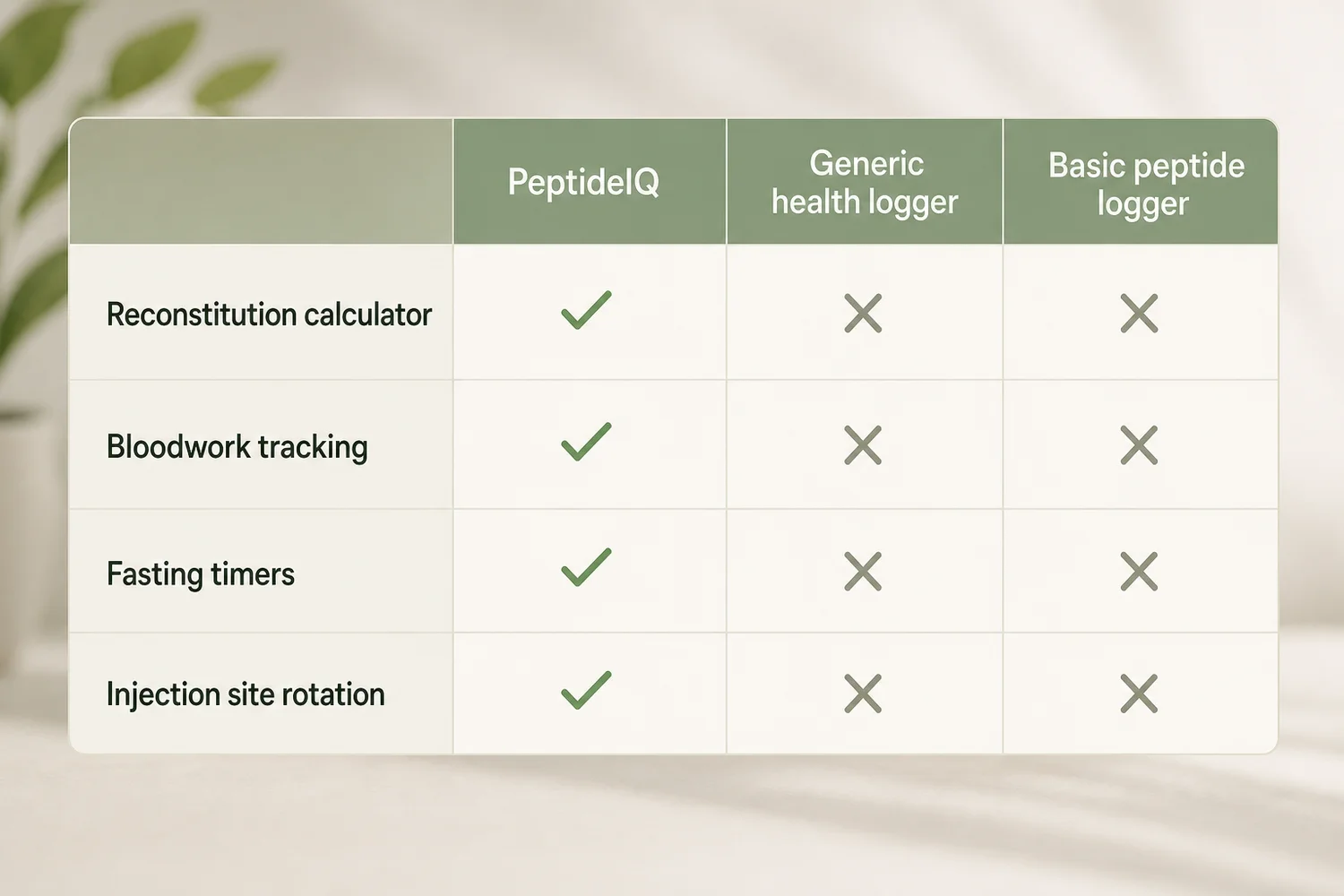 Four features that separate a peptide system from a plain log.
Why do experienced peptide users prefer PeptideIQ's AI co-pilot?
Because the co-pilot answers from your data, not from a generic peptide FAQ. It knows you are on Day 6 of a BPC-157 cycle, that your energy has sat at 4/10 for three days, and that your goal is knee recovery. The same question gets a different answer.
The assistant is also not the home screen. It is a floating button on every screen, with contextual prompts that surface after a side effect is logged or when a pattern shows up. The structure comes first; the AI sits on top of it.
Compare that with pasting your history into a chatbot each time. You become the data pipeline, and anything you forget to mention is invisible to it.
Reality check: A chatbot with excellent peptide knowledge and zero knowledge of you will still give the same answer to a first-timer and a two-year veteran.
How does PeptideIQ's AI know your situation better than competitors?
Every co-pilot conversation starts with a context payload: active protocols, current cycle day, the last 7 days of wellness logs, logged side effects, bloodwork on file, your goal, and a first-timer flag. The model answers with that payload in view, so nothing needs re-explaining.
The co-pilot screen below shows what that looks like. The user asks "How am I doing this week?" and the reply cites real numbers: pain averaging 2.8, down from 3.4 (the chart reads −18%), sleep up to 8.0, and one missed dose on a travel day. It then notes the pattern matches what you'd expect at week 6 of BPC-157, on the faster end of typical response curves.
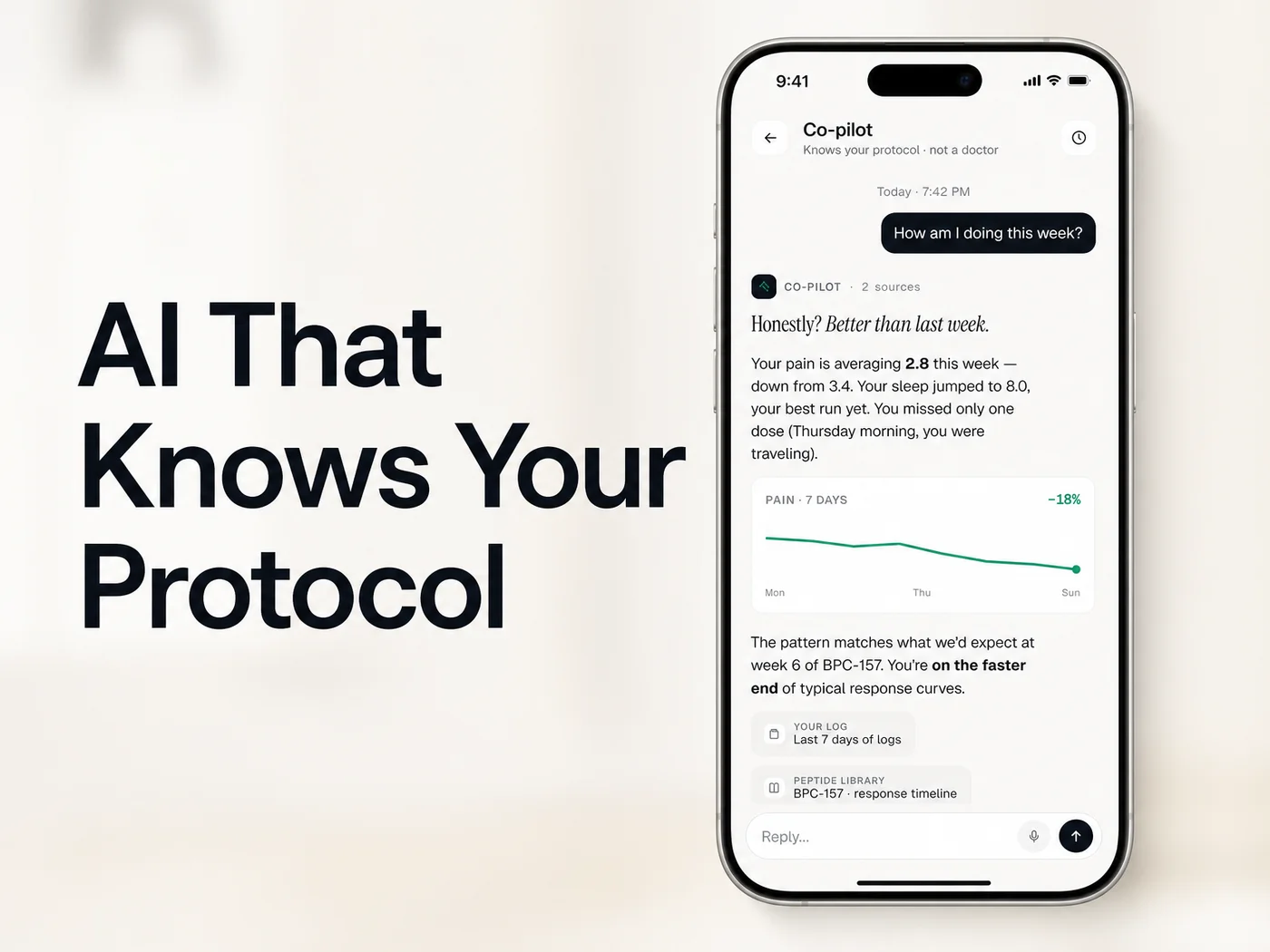 The co-pilot reads the user's own logs and cycle week before it answers.
Three things in that single reply can't come from a generic chatbot:
- The missed dose and its reason, pulled from the log.
- The cycle week, so "better than last week" gets benchmarked against a typical curve.
- Source chips showing which logs and library entry the answer drew on.
The header reads "Knows your protocol · not a doctor." That framing matters. PeptideIQ is a wellness tracking and guidance app, and the co-pilot flags when professional input is warranted instead of attaching a blanket disclaimer to everything.
PeptideIQ vs competitors: how does protocol management compare?
PeptideIQ organizes each peptide as its own protocol card with cycle day, dose, adherence, next injection site, and vial stock. A basic logger records that a dose happened. PeptideIQ plans the cycle, tracks the phase, and tells you what is due next.
The planner covers six steps: peptide, dose, optional dose escalation with automatic phase transitions, cycle length and rest weeks, injection schedule, and a review "flight plan." Fasted peptides such as Ipamorelin, CJC-1295, Sermorelin, and Tesamorelin switch on the fasting timer automatically.
A few details a logger skips:
- Injection site rotation: a body diagram marks sites green, yellow (used in the last 48 hours), or red (used today).
- Visual syringe display: it calculates the draw line from vial concentration and target dose.
- Inventory alerts: low-stock warnings fire when fewer than 7 days of doses remain, and expiry warnings fire 5 days out.
Worth knowing: Reconstitution is where beginners get stuck. The calculator takes vial mg, BAC water ml, and desired mcg, then returns concentration and exact syringe units. A reverse mode starts from the units you want to draw.
Can other peptide apps track multi-peptide stacks like PeptideIQ?
Some can log more than one peptide. Few treat a stack as a managed system, with each protocol on its own color-coded card, its own cycle clock, and one co-pilot that sees all of them together.
The Today screen below shows two active protocols side by side: Semax at 360mcg, Day 1 of 28, and Tirzepatides at 1.5mg, Day 2 of 84, both at 100% adherence. It also flags "2 bottles · 1 low stock" and prompts the co-pilot to comment on how the two protocols work as a pair.
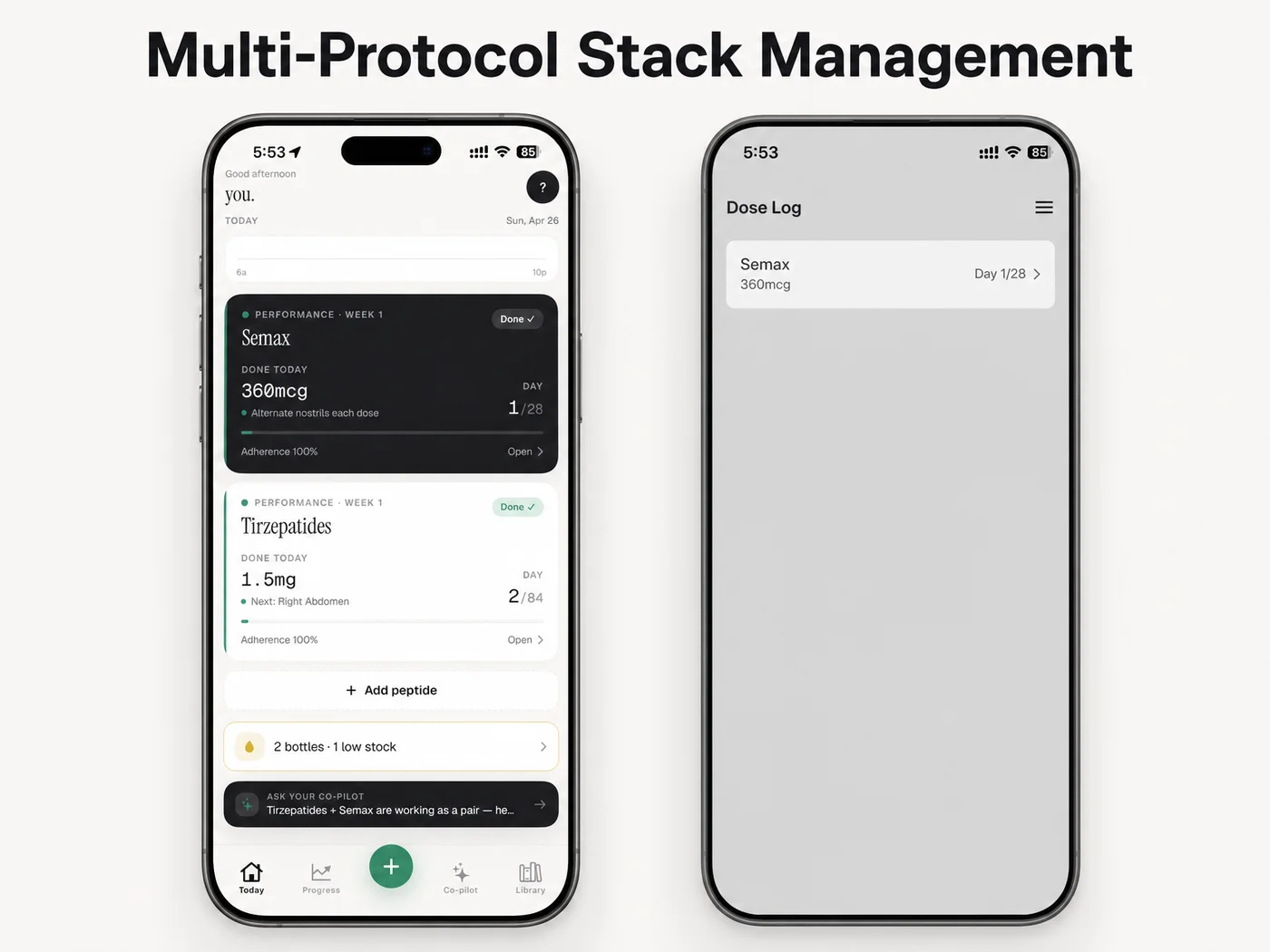 The right-hand phone is an illustrative simple dose log, not a specific competitor's app.
Stack users are exactly who gets hurt by fragmented data. Three peptides in a Notes app plus a spreadsheet means no trend view, no vendor or batch memory, and manual dose math. Stack Master, an achievement for three or more simultaneous peptides, reflects how common that setup is.
Why PeptideIQ Wins for Multi-Peptide Users
For anyone running more than one protocol, PeptideIQ is the strongest fit because it connects the pieces: schedule, calculator, labs, wellness logs, and an AI that reads all of it. A single-purpose tool covers one piece.
That is not the same as "best for everyone." If you only want to count calories, a nutrition app does that well, and PeptideIQ's meal scanner is intentionally scoped, not a full calorie tracker. If you want clinical care, no app replaces a prescriber.
Where it fits: Clive-style users with three peptides and messy notes, John-style users stacking CJC-1295 and Ipamorelin, and first-timers who need the reconstitution walkthrough on Day 1. For longevity-focused users, bloodwork trends and a doctor-friendly PDF export matter most. Our PeptideIQ review goes deeper on how each of those works.
On cost, pricing isn't announced yet. The plan is freemium, with core protocol tracking free and the co-pilot and advanced analytics on a subscription. Check our pricing guide to see if it fits your budget.
Which peptide app has a reconstitution calculator built in?
PeptideIQ does. It computes concentration and syringe draw units from vial size, BAC water volume, and target dose, supports U-100, U-50, and U-30 syringes, works offline, and saves each result to the matching vial in your inventory.
Offline support is not a footnote. Dose logging, check-ins, and the calculator all work without a connection and sync later, while the co-pilot says plainly that it's unavailable offline and that your log was saved.
Pro tip: Before you pick any app, run one real dose through its calculator and check the draw line against your own math.
Get Started with PeptideIQ
If you are comparing apps because you are tired of doing all the thinking, the fastest test is to try a system built around your protocol. PeptideIQ is iOS-first and currently pre-launch with a waitlist open.
FAQ
Is PeptideIQ better than a general AI chatbot for peptide questions?
For questions about your own protocol, yes, because the co-pilot starts with your cycle day, 7 days of logs, side effects, and bloodwork already loaded. A general chatbot has broad peptide knowledge but no memory of your data unless you retype it each time.
Does PeptideIQ replace MyFitnessPal or Cronometer?
Not entirely. Generic nutrition loggers aren't built for peptide protocols, while PeptideIQ's meal scanner is deliberately scoped to nutrition in the context of your protocol and goal. Users who want deep calorie tracking may keep a dedicated nutrition app alongside it.
Is PeptideIQ available on Android?
Not at launch. PeptideIQ is iPhone-only initially, with Android planned for a later phase and no web app at launch. The waitlist at peptideiq.io is open now.
Can PeptideIQ track bloodwork alongside my peptide protocol?
Yes. You enter lab values manually, each gets a green, yellow, or red status badge, and any marker can be charted over time against its reference range. That bloodwork also feeds the AI co-pilot's context and the one-tap doctor PDF export.